
Anúncios
X-ray scanner apps have turned into a genuinely popular niche, blending playful visuals with camera filters that mimic scientific imaging for entertainment purposes. 📱
These apps don’t actually see through objects — they’re built on clever image processing, overlay effects, and augmented reality tricks that create a convincing illusion. The appeal lies in the novelty factor and the fun of sharing prank-style content with friends.
If you’ve ever wondered how an x-ray scanner app works, what features set a good one apart, or how to pick the right app for your phone, this guide breaks it all down with real examples and practical tips.
How an X-Ray Scanner App Actually Works#
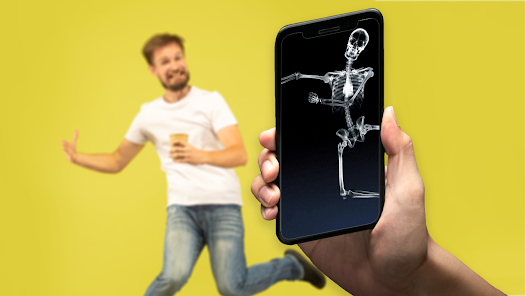
Despite the name, no mobile camera can genuinely penetrate solid materials like a medical x-ray machine. What these apps deliver instead is a simulated visual effect using software layers.
- Image overlay technology: the app places a pre-rendered “skeleton” or “internal structure” image on top of whatever the camera captures.
- Edge detection algorithms: some apps analyze contours and shapes in real time to align the fake x-ray layer more convincingly with the subject.
- Color inversion filters: a classic trick involves inverting colors and adjusting contrast to mimic the black-and-white tones of real radiographic images.
- Augmented reality (AR) tracking: newer apps use AR frameworks to make the illusion move naturally as the phone or subject shifts position.
None of this involves actual radiation or scanning hardware. It’s pure software illusion, which is exactly why these apps are legal, safe, and widely available on both Android and iOS.


The Role of Camera Filters in the Illusion#
Camera filters are the backbone of any convincing x-ray simulator. A well-designed filter adjusts brightness, saturation, and grain to match the gritty aesthetic people associate with medical imaging.
Apps that nail this detail tend to feel more “real” during casual use, even though everyone involved understands it’s just for laughs.
Key Features That Separate a Good X-Ray App From a Mediocre One#
Not every scanner app delivers the same experience. After testing dozens of these tools, a few features consistently stand out as differentiators.
| Feature | Why It Matters |
|---|---|
| Real-time preview | Lets users see the effect live instead of applying it only after taking a photo |
| Multiple scan modes | Bone scan, body scan, object scan — variety keeps the app entertaining longer |
| Video support | Static photos are fun, but video clips add a dynamic, shareable layer |
| Low storage footprint | Prank apps shouldn’t eat up gigabytes of phone storage |
| No excessive permissions | A scanner app has no legitimate reason to request contacts or location access |
Apps lacking these basics often feel clunky, show excessive ads, or drain battery faster than they should.
Permissions You Should Actually Expect#
A trustworthy x-ray simulator typically asks for camera access and, optionally, storage access to save images. Anything beyond that — like microphone access for a photo filter app — is worth questioning before installing.
Popular Use Cases Beyond Simple Pranks#
While the prank angle gets most of the attention, people use these apps for several other purposes that go beyond a quick laugh.
- Content creation: TikTok and Instagram creators use x-ray-style filters to produce eye-catching short videos.
- Classroom demonstrations: some educators use simplified versions to introduce kids to the concept of medical imaging in a lighthearted way.
- Party entertainment: at gatherings, these apps become an easy icebreaker activity.
- App design inspiration: developers sometimes study these AR tricks to learn about overlay rendering techniques.
The versatility explains why this category keeps generating consistent downloads year after year, even without groundbreaking new functionality.

Xray scan filter cam
Installs5M+
Size89.0MB
PlatformAndroid/iOS
PriceFree
Information about size, installs, and rating may change as the app is updated in the official stores.
Choosing the Right X-Ray Simulator for Your Phone#
With dozens of options on both app stores, picking one can feel overwhelming. A practical approach is to focus on four criteria: performance, ad frequency, update history, and user reviews.
Checking Performance Before You Commit#
Download the app, open it immediately, and test how fast the camera loads. If there’s a noticeable lag between opening the app and seeing the live feed, that’s a sign of poor optimization.
Apps built with lightweight rendering engines tend to run smoothly even on mid-range devices, which matters since not everyone owns a flagship phone.
Reading Reviews With a Critical Eye#
Star ratings alone don’t tell the full story. Look specifically for comments mentioning crashes, intrusive ads, or sudden permission changes after updates — these patterns reveal more than a generic five-star average.
Apps with consistent 4+ star ratings across hundreds of reviews, paired with recent update dates, usually indicate active developer support.
Common Misconceptions About X-Ray Apps#
A surprising number of people genuinely believe these apps can see through clothing or walls. This misunderstanding has followed the category since its early days on app stores.
- Myth: the app uses real x-ray technology. Reality: it’s 100% visual simulation through software filters.
- Myth: these apps require special hardware. Reality: any standard smartphone camera works fine.
- Myth: the images are scientifically accurate. Reality: they’re stylized approximations designed for entertainment, not anatomical precision.
Setting expectations correctly from the start makes the experience more enjoyable — you know you’re getting a fun visual gag, not a medical device in your pocket.
Privacy Considerations Worth Knowing#
Since these apps work directly with your camera, it’s reasonable to think about data handling before downloading. Checking the privacy policy takes less than two minutes and can save headaches later.
| What to Check | Red Flag |
|---|---|
| Data collection scope | Collecting more than camera/photo access without explanation |
| Third-party sharing | Vague language about sharing data with “partners” |
| Ad network transparency | No mention of which ad providers are used |
Most reputable scanner apps are straightforward about this since they don’t need deep data access to function. If a free photo filter app asks for your contact list, that mismatch deserves a second look.
Tips to Get the Most Realistic Results#
Getting a convincing effect isn’t automatic — a bit of technique goes a long way.
- Use good lighting: harsh shadows throw off edge detection and make overlays look misaligned.
- Keep the camera steady: motion blur breaks the illusion almost instantly.
- Choose the right mode for the subject: body scan modes work best on people, while object modes suit bags or boxes.
- Record short clips instead of long videos: the effect holds up better in 10-15 second bursts than in extended footage.
Small adjustments like these separate a believable clip from an obviously fake one, which matters if you’re sharing content for laughs on social media.
What’s Next for Augmented Reality Filter Apps#
The underlying technology behind x-ray simulators keeps improving as AR frameworks from Google and Apple become more accessible to indie developers. Expect sharper edge tracking, better lighting adaptation, and more realistic overlay blending in future updates.
Some developers are also experimenting with machine learning models trained to detect body poses more accurately, which could make the next generation of these apps noticeably more fluid than today’s versions.
For now, though, the fun remains rooted in simplicity — a quick download, a few taps, and an entertaining filter that turns an ordinary phone camera into a playful imitation of futuristic scanning tech. 🦴

Keep reading
You might also like

Open Relationships: Married Couples Seeking Partners Together
Open marriages are becoming a topic couples discuss openly, especially when they start inviting other people into their dynamic as a unit…

How to Build Emergency Kits for Power Outage Survival
When the power grid fails, having a well-organized emergency kit makes the difference between chaos and calm. Here's how to build yours.…