
Anúncios
Curious what an X-ray scanner app actually does, or whether one could ever work like a real scanner? Let’s break down the reality behind the trend. 📱
X-ray scanner apps have become one of the most searched-for novelty tools on app stores, pulling millions of downloads from people curious about photo filters, prank tools, and simulated scanning effects.
Before installing one, it helps to understand exactly what these apps can do, what they can’t, and how to pick a version that’s fun without being misleading or unsafe.
What an X-Ray Scanner App Really Does#
Despite the name, these apps don’t use actual radiation or penetrate solid objects. There’s no hardware in a smartphone capable of producing real X-ray imaging — that technology requires specialized equipment, radiation shielding, and medical-grade sensors.
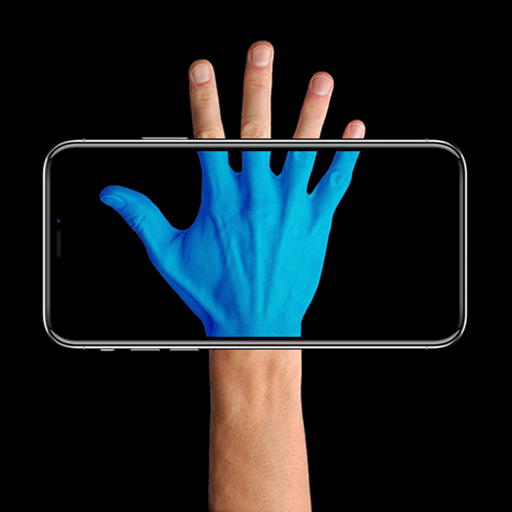
What these apps actually offer is a **visual effects engine**. They apply filters, overlays, and image processing tricks to your camera feed or saved photos to simulate the look of an X-ray scan. Think of it as a creative photo filter with a sci-fi twist.
- 📸 Camera filters that mimic blue/green scanning tones
- 🎭 Prank modes that simulate “scanning” a friend’s phone or body
- 🖼️ Photo editing tools with skeletal or X-ray-style overlays
- 🎮 Entertainment features like fake body scan animations
Some apps lean heavily into the prank angle, letting users “scan” an object and reveal a funny or exaggerated internal image — purely for laughs, not accuracy.


The Technology Behind the Illusion#
Most of these apps rely on **pre-set image libraries** combined with real-time camera overlay techniques. When you point the camera at something, the app swaps in a stored image or applies a color-shifted filter that creates the illusion of transparency.
Some more advanced apps use augmented reality (AR) frameworks like ARKit or ARCore to track movement and make the scanning animation feel more responsive, even though the underlying content is still simulated.
Popular Features Users Actually Look For#
Based on app store reviews and download trends, a few features consistently drive engagement in this category:
| Feature | Purpose | Typical User Interest |
|---|---|---|
| Scan Animation | Simulates a scanning bar moving across the screen | High — core novelty appeal |
| Prank Mode | Fakes scanning a person or object for jokes | Very High — social sharing |
| Photo Filters | Applies X-ray style tones to existing photos | Medium — creative editing |
| Sound Effects | Adds scanner beeps and mechanical sounds | Medium — immersion boost |
| Save & Share | Lets users export and post results | High — social media use |
Apps that combine a believable animation with shareable results tend to perform better in long-term retention, according to app analytics patterns across the entertainment category.
Why Prank-Style Apps Keep Trending#
Novelty camera apps tap into a simple psychological driver: **curiosity mixed with humor**. Watching a friend’s reaction to a fake “scan” creates a shareable moment, which fuels organic word-of-mouth growth — something traditional marketing struggles to replicate.
This is also why many of these apps rank consistently in the “Entertainment” or “Photography” categories rather than “Tools,” since their core value is experiential, not functional.
How to Choose a Safe and Reliable App#
Not all apps in this niche are built with the same care. Since they often request camera and storage permissions, it’s worth checking a few things before downloading.
- 🔒 Review requested permissions — camera access makes sense, but excessive data requests don’t
- ⭐ Check recent reviews, not just the overall star rating
- 📦 Confirm the app size matches its functionality (overly large size can indicate bundled ad trackers)
- 🚫 Avoid apps that claim “real X-ray vision” — that’s a red flag for misleading marketing
- 🔄 Look for apps with recent updates, which usually means active developer support
A well-designed app will clearly label itself as a simulator or prank tool, setting honest expectations from the first screen.
Permissions That Should Raise Questions#
Some free apps in this category monetize through aggressive ad networks, which sometimes request access to contacts, location, or background data that has nothing to do with camera filters. If a scanning app asks for your contact list, that’s worth pausing on.
Comparing permission requests across similar apps before installing is a simple way to spot outliers.

Xray scan filter cam
Installs5M+
Size89.0MB
PlatformAndroid/iOS
PriceFree
Information about size, installs, and rating may change as the app is updated in the official stores.
Creative Ways People Use X-Ray Camera Apps#
Beyond pranks, users have found surprisingly creative uses for scanner-style effects:
- 🎬 Content creators use the scan animation as a transition effect in short videos
- 🎉 Party hosts use prank mode as an icebreaker activity
- 🖼️ Photographers experiment with the color filters for stylized edits
- 📚 Teachers use the visual metaphor to introduce basic concepts about imaging technology (with context on real X-rays)
This versatility is part of why the category has stayed relevant for years instead of fading as a one-time fad.
Combining Effects With Social Media Trends#
Short-form video platforms have amplified interest in these apps. A quick “scan reveal” clip fits perfectly into the fast-paced, reaction-driven format that platforms like TikTok and Instagram Reels favor.
Developers have noticed this shift, and many recent updates include built-in export formats optimized for vertical video, making it easier to post directly without extra editing steps.
Setting Realistic Expectations Before You Download#
It helps to frame these apps correctly from the start: they’re **entertainment tools**, not diagnostic or security devices. No app on a regular smartphone can see through walls, clothing, or solid objects using real X-ray physics.
That said, the entertainment value is real. A good scanner-style app delivers:
- ✅ Smooth animations that feel responsive
- ✅ Clear labeling as a simulation
- ✅ Reasonable permission requests
- ✅ Shareable output for photos or short clips
- ✅ Light, fast performance without excessive battery drain
Checking reviews specifically mentioning performance on your phone model can save you from installing something that lags or crashes frequently.
Getting the Most Out of the Experience#
Try testing the free version first, since many apps offer limited filters before asking for a premium unlock. This lets you judge animation quality and interface responsiveness before committing to any purchase.
Pay attention to update frequency too — apps updated within the last few months are more likely to work smoothly with your device’s current operating system.
Scanner-style camera apps occupy a fun, low-stakes corner of the app world. They’re not meant to replace real imaging technology, but as a source of quick laughs, creative filters, and shareable moments, they’ve carved out a lasting place on millions of phones.

Keep reading
You might also like

Open Relationships: Married Couples Seeking Partners Together
Open marriages are becoming a topic couples discuss openly, especially when they start inviting other people into their dynamic as a unit…

How to Build Emergency Kits for Power Outage Survival
When the power grid fails, having a well-organized emergency kit makes the difference between chaos and calm. Here's how to build yours.…